Posts

Showing posts with the label Permissions

Apply Permissions to Custom UI Links / Actions in SharePoint Menus and Settings Pages
Image
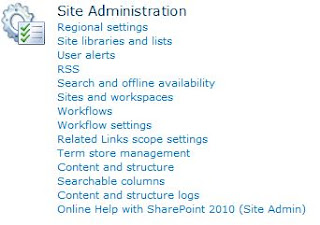
This post explains how to incorporate permissions into custom links and actions added to the UI on menus, toolbars and default layout pages such as the Site Settings page in SharePoint 2010 .     Examples included in the post are: Restricting custom links on list settings pages to only site collection administrators Adding custom actions to the Document Library dropdown menu (ECB - Edit Control Block) that are displayed only to users with edit permissions on the document. Displaying a link on the Site Actions menu only to users with access to manage  permissions for the current site. Displaying a custom link on the List Actions menu for users with access to manage the list. Display a link on the Site Settings page of a site to users with access to add and customise pages on the site, as well as apply themes and stylesheets to the site (Site Designers).

Permission Based Content in SharePoint (With Examples)

The examples in this tutorial demonstrate how to restrict certain content or controls on a page in SharePoint to specific users based on their permissions .  It can be applied to a Master Page, or directly to a .aspx page in SharePoint using SharePoint Designer.  Many options are available to configure exactly how and when the content should be displayed using the base permissions available in SharePoint with the SPSecurityTrimmedControl class. The complete list of base permissions that can be used with the class can be viewed on this page: SPBasePermissions .  It is also possible to show or hide content based on user authentication using the AuthenticationRestrictions property of the class, which may be useful if you want to display a different set of links depending on if a user has been authenticated or is anonymous. Below are some examples of base permissions that are more likely to be used to restrict content to specific users with the associated permi...

Multiple Site Permissions Report Using Excel

Managing SharePoint site permissions can become difficult when the Site Collection expands to have many sites with different permission settings for each. This is especially true if the permissions are not inherited from a parent site, list or library, or item level permissions are used on items in a list or library. Some third party reporting tools provide an overview of the permission applied across a site collection, with the possibility to drill down to more detailed information about the configuration of groups and permissions applied to each site. This article explains how to use Excel to create a single report with  permissions of multiple sites in one site collection. This is achieved by using data connections and a "Web Query", by selecting the "world" option in Excel 2007 to create a data connection to configure. The address on the site permissions page for each site is added to a separate Web Query link, which retrieves the specified page from Share...

Access Denied when trying to upload multiple files to a SharePoint Library

Problem: Access Denied page when uploading files using SharePoint's multiple file upload interface. No details are displayed when the upload fails except the Access Denied page. In my case, this was not related to permission on the site or document library as the Access Denied page suggests. After uploading one of the files using the single file upload interface, an illegal character message displayed. Once the illegal character was removed, bother the single and multiple file upload interfaces were able to upload the file(s) successfully. For more information about illegal/unsupported characters in SharePoint document libraries see Illegal Characters in SharePoint Document Libraries . If a large number of files are being uploaded or migrated into SharePoint, there may be many with filenames containing illegal characters. File rename utilities allow conditional renaming of files to remove or replace characters and strings. See Bulk File Rename files to remove or replace illegal cha...

Illegal Characters in SharePoint Document Libraries

The following characters are unsupported / illegal in SharePoint document libraries: & " : * ? # {} % ~ / \ Tab If the file name of a document contains any of the characters above, a message will be displayed noting SharePoint's illegal characters. If using the multiple upload interface, the response will be an Access Denied page. See Access Denied when trying to upload multiple files to a SharePoint Library . For details about bulk file renaming if a large number of files and documents contain illegal characters, see Bulk File Rename files to remove or replace illegal characters - allow upload/migration to SharePoint Document Library .