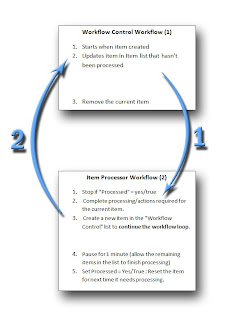
How to configure a workflow to start at specific time, then loop / repeat periodically (Daily, Weekly)

The following method can be used to start a workflow at a specific time, then repeat periodically (each day). Periodic Workflow Processing (send daily email notification or reminder) A useful implementation of this technique allows you to configure workflows to run as background tasks at a specific time instead of being triggered by a user manually, or after creating or modifying a list item. This allows processing of data from SharePoint to take place during times when the SharePoint environment is not being used as well as performing tasks that take a long time to complete. For example, this method can be used to configure a looping timer workflow to run at COB each day (5:00pm) to perform calculations and processing on a list item before emailing a reminder, or details to a user associated with the list item or document. When initiated for the first time, the workflow waits until the specified time (5:00PM) before executing workflow actions. After the workflow is complete, a seconda...